
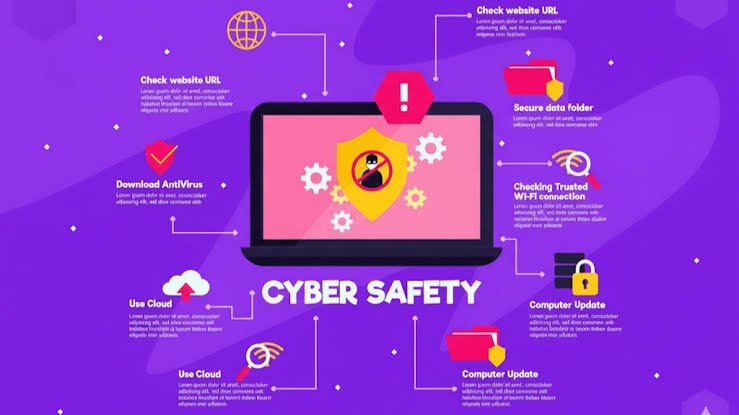
The internet has become an important part of everyday life. We use it to communicate with friends and family, shop online, manage bank accounts, study, work, watch entertainment, and store personal information. While technology makes life easier, it also creates new risks. Cybercriminals, scammers, hackers, and malicious websites are constantly looking for opportunities to steal information or gain access to online accounts.
This is why Digital Safety is more important than ever.
Digital safety means protecting your personal information, devices, accounts, and online identity from threats. It is not only about installing antivirus software or creating complicated passwords. It also involves making smart decisions about what you share online, recognizing suspicious messages, keeping software updated, and understanding how online scams work.
Whether you are a student, employee, business owner, parent, or casual internet user, developing good digital safety habits can significantly reduce your chances of becoming a victim of online threats.
What Is Digital Safety?
Digital safety refers to the practices and precautions people use to stay protected while using digital devices and online services. These devices can include smartphones, computers, tablets, smart TVs, and other internet-connected technology.
Digital safety covers several areas, including protecting passwords, securing social media accounts, avoiding online scams, safeguarding financial information, and maintaining privacy.
For example, using a unique password for your email account is a simple digital safety practice. Enabling two-factor authentication is another. Avoiding unknown links in emails and text messages is also part of staying safe online.
The goal is not to completely avoid technology. Instead, digital safety helps people use technology confidently while reducing unnecessary risks.
Why Is Digital Safety Important?
People share a large amount of personal information online. Names, addresses, phone numbers, photographs, financial details, work information, and even location data can sometimes be collected or exposed.
If this information falls into the wrong hands, it can lead to identity theft, financial fraud, account takeovers, or other problems.
One of the biggest reasons digital safety matters is that online threats can affect anyone. You do not have to be a famous person or own a large company to become a target. Automated attacks can target thousands or even millions of users at once.
Strong digital safety habits also protect your reputation. Something posted online can sometimes remain accessible for years. Being careful about what you publish can help prevent personal information or inappropriate content from causing problems later.
For businesses, digital safety is equally important because a security incident can result in lost data, financial damage, downtime, and loss of customer trust.
Create Strong and Unique Passwords
Passwords are one of the first lines of defense for online accounts. Unfortunately, many people still use simple passwords or reuse the same password across multiple websites.
This creates a serious security problem. If one website experiences a data breach and your password is exposed, criminals may try that same password on your email, banking, shopping, or social media accounts.
A better approach is to use a different, strong password for every important account. Passwords should generally be long and difficult to guess. Avoid using easily available information such as your name, birthday, address, or favorite sports team.
A password manager can also help you create and store unique passwords without requiring you to memorize every one.
Use Two-Factor Authentication
Two-factor authentication, often called 2FA, provides an additional layer of protection.
Normally, logging into an account requires a password. With two-factor authentication enabled, you may also need to enter a temporary code, approve a login through an authentication app, or use another verification method.
This means that even if someone discovers your password, they may still be unable to access your account.
Whenever possible, enable two-factor authentication on important accounts, especially email, banking, social media, and cloud storage accounts.
Be Careful With Emails and Messages
Phishing is one of the most common online threats. In a phishing attack, someone attempts to trick you into revealing sensitive information by pretending to be a legitimate person, company, or organization.
A phishing message might claim that your account has been locked or that you need to confirm payment information. It may contain a link to a fake website designed to steal your username and password.
Do not automatically trust a message simply because it looks professional. Check the sender, examine links carefully, and be suspicious of messages that create a strong sense of urgency.
If a message asks you to provide sensitive information or make an unexpected payment, verify the request through an official channel before taking action.
Keep Your Devices and Software Updated
Software updates are not only about adding new features. They often include important security fixes that protect devices against newly discovered vulnerabilities.
Ignoring updates for your phone, computer, browser, or applications can leave known security weaknesses unprotected.
Turn on automatic updates whenever practical. Also update your operating system, web browser, mobile applications, and security software regularly.
If a device is no longer receiving security updates, consider replacing it when possible, particularly if you use it for sensitive activities such as online banking.
Protect Your Personal Information
Think carefully before sharing personal information online. Social media platforms can make it easy to reveal details about your life without realizing how much information you are providing.
For example, posting your full birth date, home address, phone number, travel plans, or workplace details publicly can create unnecessary privacy risks.
Review the privacy settings of your social media accounts and other online services. Remember that privacy settings can change over time, so it is useful to check them periodically.
You should also be cautious when taking online quizzes, entering giveaways, or signing up for websites that request more personal information than necessary.
Use Public Wi-Fi Carefully
Public Wi-Fi can be convenient when you are in an airport, hotel, café, library, or shopping center. However, not every public network is trustworthy.
Avoid performing highly sensitive activities on unfamiliar networks when possible. If you need to access an important account while using public Wi-Fi, make sure your connection is secure and that you are visiting the legitimate website or application.
It is also important to disable automatic connection to unknown Wi-Fi networks on your devices. Your device should not automatically connect to every network it encounters.
Be Smart About Social Media
Social media is a major part of modern communication, but it can also create digital safety challenges.
Fake profiles, scams, impersonation, harassment, and malicious links can appear on popular social platforms. Some criminals use information from public profiles to make their scams seem more believable.
Avoid accepting connection or friend requests from people you do not know without a good reason. Be cautious about direct messages containing unexpected links, investment opportunities, giveaways, or requests for money.
Before posting something publicly, consider whether you would be comfortable with that information being seen by strangers.
Back Up Important Data
Digital safety also involves preparing for situations where your information becomes unavailable or damaged.
Important documents, photographs, school projects, work files, and other valuable data should be backed up regularly.
You can use an external storage device, a reputable cloud service, or a combination of backup methods. Keeping more than one copy of important files can provide additional protection if your device is lost, damaged, or affected by malware.
A backup is especially valuable because some cyberattacks can prevent users from accessing their own files.
Teach Children About Digital Safety
Children spend more time online than ever, making digital safety education particularly important.
Parents and guardians can teach children not to share private information with strangers, click suspicious links, or meet online contacts in person without appropriate adult involvement.
Children should also understand that people online are not always who they claim to be. Encourage open communication so they feel comfortable discussing uncomfortable messages, cyberbullying, or suspicious online experiences.
Rather than simply telling children what they cannot do online, teach them why certain behaviors are risky. This can help them make safer decisions as they become more independent.
What to Do If Something Goes Wrong
Even people with strong digital safety habits can sometimes make mistakes. If you believe an account has been compromised, act quickly.
Change the affected password and any other accounts using the same password. Enable two-factor authentication if it was not already active. Check recent account activity for anything suspicious.
If financial information may have been exposed, contact your bank or financial institution through an official contact method. If malware is suspected, disconnect the affected device from the internet when appropriate and seek trusted technical assistance.
The most important thing is not to panic. Taking quick, organized steps can limit the potential damage.
Frequently Asked Questions About Digital Safety
1. What is digital safety in simple words?
Digital safety means protecting your personal information, online accounts, devices, and privacy while using the internet and digital technology. It includes practices such as using strong passwords, avoiding suspicious links, enabling two-factor authentication, and keeping devices updated.
2. Why is digital safety important?
Digital safety is important because personal information and online accounts can be targeted by scammers, hackers, and other cybercriminals. Good security habits can reduce the risk of identity theft, financial fraud, account hacking, and loss of important data.
3. What is the most important digital safety habit?
There is no single habit that protects against every threat. However, using unique and strong passwords combined with two-factor authentication provides strong protection for important online accounts. Being cautious with unexpected messages and links is also extremely important.
4. How can I protect my personal information online?
Share only the information that is necessary, review privacy settings, avoid posting sensitive details publicly, and be careful about websites or people requesting personal information. You should also use secure passwords and two-factor authentication for important accounts.
5. Can children learn digital safety?
Yes. Children can learn digital safety through age-appropriate guidance and regular conversations. They should understand the importance of protecting personal information, recognizing suspicious behavior, avoiding unknown links, and telling a trusted adult when something online makes them uncomfortable.
Final Thoughts
Digital safety is not a one-time task. Online threats continue to change, and new technologies create new opportunities as well as new risks.
The good news is that staying safer online does not require advanced technical knowledge. Simple habits such as using strong passwords, enabling two-factor authentication, keeping software updated, avoiding suspicious links, protecting personal information, and backing up important files can make a significant difference.
The internet is a powerful tool for learning, communication, business, and entertainment. By practicing good digital safety habits, you can enjoy its benefits while reducing the risks that come with being connected.