
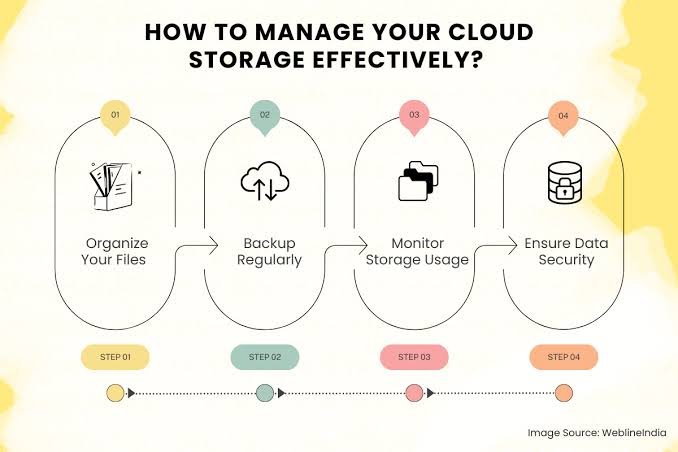
In today’s digital world, data has become one of the most valuable things we have. Photos, videos, documents, business files, school projects, and personal information are created and stored every day. As the amount of digital information continues to grow, people need a safe and convenient way to keep their files without depending entirely on their computers, phones, or external hard drives. This is where Cloud Storage becomes useful.
Cloud storage allows users to save their files on remote servers that can be accessed through the internet. Instead of keeping everything on a physical device, your data can be stored online and accessed whenever you need it. Whether you are a student, employee, business owner, photographer, or regular internet user, cloud storage can make managing digital files much easier.
What Is Cloud Storage?
Cloud storage is a service that allows you to store digital files on servers managed by a cloud service provider. These servers are usually located in secure data centers and are connected to the internet.
When you upload a file to cloud storage, it is transferred from your device to the provider’s servers. Once the upload is complete, you can access the file from another supported device as long as you have an internet connection and the necessary login credentials.
For example, imagine that you have hundreds of family photos saved on your smartphone. If your phone is lost or damaged, those photos could disappear. If you have backed them up to cloud storage, you may still be able to access them from a computer, tablet, or another phone.
Cloud storage is not limited to photos. It can be used for documents, spreadsheets, presentations, videos, audio files, software projects, and many other types of digital information.
How Does Cloud Storage Work?
The basic idea behind cloud storage is fairly simple. A cloud storage company maintains powerful servers and storage systems in data centers. Users connect to these systems through the internet.
When you create an account with a cloud storage provider, you normally receive a certain amount of storage space. You can then upload files to your account using a website, mobile application, or desktop software.
Many services also provide synchronization features. This means a folder on your computer or phone can automatically stay synchronized with your online storage. If you edit a file on one device, the updated version can be made available on your other connected devices.
Cloud storage providers generally use multiple servers and backup systems to help protect stored information. However, users should still understand the provider’s security and backup policies rather than assuming that every cloud service offers the same level of protection.
Why Is Cloud Storage Important?
One of the biggest reasons cloud storage has become popular is convenience. Traditional storage methods require users to carry physical devices such as USB drives or external hard disks. Cloud storage reduces the need to depend on these devices for everyday file access.
Another major benefit is accessibility. If your files are stored online, you can potentially access them from different locations and devices. This is especially useful for people who work from home, travel frequently, or use multiple devices.
Cloud storage can also be useful for protecting important files. Computers and smartphones can fail unexpectedly. Hard drives can become corrupted, and physical storage devices can be lost or damaged. Keeping another copy of important information in the cloud can reduce the risk of permanent data loss.
Main Benefits of Cloud Storage
Easy File Access
Cloud storage makes it possible to access files without carrying a physical storage device everywhere. You can log into your account through a supported device and find the files you need.
This can be particularly helpful when working away from home or the office. Instead of sending files to yourself through email or carrying a USB drive, you can simply access your online storage.
Automatic Synchronization
Many cloud storage services offer automatic synchronization. This feature can save time because users do not always have to manually transfer updated files between devices.
For example, you might start working on a document using a laptop and later continue editing it on a tablet. If synchronization is enabled, the latest version can be available across your connected devices.
Data Backup
Cloud storage can serve as an additional place to keep copies of important files. If a device stops working, you may still have access to files that were uploaded or synchronized to the cloud.
However, cloud storage should not always be treated as the only backup solution. For extremely important information, maintaining multiple backups can provide better protection.
Saves Physical Space
Cloud storage reduces the need for large collections of physical storage devices. Instead of purchasing several external drives for everyday files, users can keep many documents and media files online.
This can be especially useful for people who regularly create large amounts of digital content.
Easy File Sharing
Sharing files can also become easier with cloud storage. Instead of attaching large files to an email, users can often create a sharing link or give another person access to a particular file or folder.
This is useful for students working on group assignments and businesses collaborating on projects.
Cloud Storage for Businesses
Businesses deal with enormous amounts of information. Contracts, invoices, reports, customer files, presentations, marketing materials, and project documents all require reliable storage.
Cloud storage can help companies organize this information while allowing employees to access files from different locations. It can also support remote and hybrid work because team members can collaborate without being physically present in the same office.
Businesses should carefully consider security, user permissions, compliance requirements, backup policies, and administrative controls before selecting a cloud storage solution. Sensitive business information may require stronger security measures than ordinary personal files.
Another advantage is scalability. A business may need only a small amount of storage at first but require significantly more as it grows. Cloud-based services often make it easier to increase storage capacity without purchasing and installing additional physical hardware.
Cloud Storage Security
Security is one of the most important considerations when using cloud storage. Although reputable providers use various security technologies to protect data, users also have responsibilities.
A strong password is a basic but important step. Users should avoid simple passwords that are easy to guess. Two-factor authentication can provide another layer of protection by requiring an additional verification step during login.
It is also important to be careful when sharing files. A sharing link that is available to anyone with the link may expose information to unintended people. Before sharing a document, check the access settings and make sure only the appropriate individuals can view or edit it.
Users should also keep their devices updated and avoid logging into cloud accounts on untrusted public computers.
How to Choose the Right Cloud Storage Service
There are many cloud storage options available, and the best choice depends on your individual needs.
First, consider how much storage you actually need. Someone who mainly stores documents may need far less space than a photographer or video creator.
Next, look at compatibility. Make sure the service works well with your preferred operating systems and devices. If you regularly use both a smartphone and a computer, convenient mobile and desktop applications can make a big difference.
Security should also be a priority. Check whether the provider offers features such as encryption, two-factor authentication, access controls, and account recovery options.
Pricing is another factor. Some providers offer free storage with limited capacity, while larger plans require a monthly or yearly subscription. Compare the storage amount and features rather than choosing a service based only on price.
Finally, consider ease of use. A storage service may offer many advanced features, but if its interface is confusing, you may not enjoy using it.
Cloud Storage vs. Physical Storage
Physical storage and cloud storage both have their advantages.
External hard drives and USB drives can provide fast access without requiring an internet connection. They also give users direct physical control over their files. However, physical devices can be lost, damaged, stolen, or affected by hardware failure.
Cloud storage provides convenient remote access and makes sharing easier. It can also provide an additional copy of important information. The main limitation is that access usually depends on an internet connection, and users must trust the cloud provider to manage their data appropriately.
For many people, the best approach is not to choose one method exclusively. Combining cloud storage with physical backups can create a more reliable overall storage strategy.
Common Mistakes to Avoid
Although cloud storage is convenient, users can still make mistakes.
One common mistake is using the same weak password across multiple accounts. If that password is compromised, several accounts could become vulnerable.
Another mistake is sharing files without checking permissions. Always review who can access a file before sending a sharing link.
Some users also assume that everything stored in the cloud is automatically backed up forever. This is not necessarily true. Files can be deleted accidentally, synchronization can remove changes, and accounts can have specific retention policies.
It is also a mistake to ignore account security. Enabling two-factor authentication and keeping recovery information updated can make it easier to protect and recover your account.
The Future of Cloud Storage
As digital data continues to increase, cloud storage is likely to remain an important part of modern technology. Businesses are generating more information, people are creating larger media libraries, and remote work continues to depend on digital access.
Future cloud storage systems may become more intelligent, efficient, and integrated with other technologies. Improved security systems, faster data transfer, better collaboration tools, and smarter file management could make online storage even more convenient.
For everyday users, the biggest change may simply be that storing and accessing information becomes increasingly seamless. Instead of thinking about where a file is physically located, users can focus more on how they want to use it.
Frequently Asked Questions
1. What is Cloud Storage?
Cloud storage is a service that allows users to save digital files on remote servers operated by a cloud provider. These files can usually be accessed through the internet using computers, smartphones, tablets, or other supported devices.
2. Is Cloud Storage Safe?
Cloud storage can be safe when you use a reputable provider and follow good security practices. Using a strong, unique password, enabling two-factor authentication, and carefully controlling file-sharing permissions can help protect your account and information.
3. Can I Use Cloud Storage for Free?
Yes, many cloud storage providers offer free plans with limited storage space. Free plans can be suitable for basic documents, photos, and personal files. Users who need more storage or advanced features may need to choose a paid plan.
4. Can Cloud Storage Replace a Hard Drive?
Cloud storage can replace some everyday uses of a hard drive, especially when it comes to accessing and sharing files. However, it is usually better not to rely on a single storage method for critical information. Keeping an additional physical or separate backup can provide extra protection.
5. What Types of Files Can I Store in the Cloud?
You can generally store many types of digital files, including documents, photographs, videos, music, presentations, spreadsheets, PDFs, and other personal or professional files. The exact file limits and supported features depend on the cloud storage provider.
Final Thoughts
Cloud storage has changed the way people store, access, share, and protect digital information. It provides a convenient alternative to relying completely on local storage devices and can be useful for both personal and professional needs.
From backing up family photos to managing important business documents, cloud storage offers flexibility and accessibility that traditional storage methods may not provide on their own.
However, convenience should always be balanced with security. Choosing a trustworthy provider, using strong account protection, managing sharing permissions carefully, and maintaining additional backups for critical information can help users get the most from cloud storage.
As our dependence on digital information continues to grow, understanding how cloud storage works and how to use it responsibly is becoming an important part of managing our digital lives.