
Cloud computing has become an important part of how modern businesses store data, run applications, and manage their digital operations. As organizations grow, however, they often discover that using a single cloud environment may not meet every technical, financial, or security requirement.
Some businesses need to keep sensitive information on their own infrastructure while using cloud services for other workloads. Others prefer to use services from multiple cloud providers to access different features, improve flexibility, or reduce dependence on a single vendor.
This is where hybrid cloud and multi-cloud strategies come into the picture.
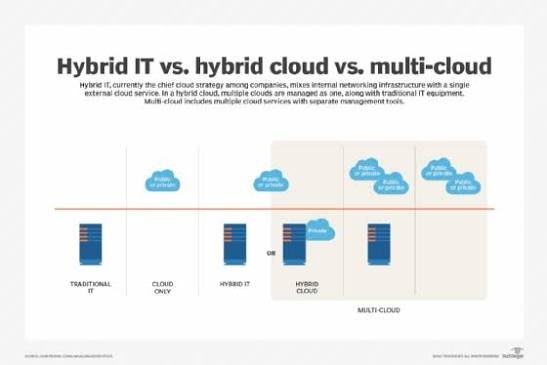
Although these two approaches may sound similar, they serve different purposes. Hybrid cloud combines private infrastructure with public cloud services, while multi-cloud involves using services from two or more cloud providers. In some cases, businesses use both approaches at the same time.
Understanding the differences can help organizations choose the right cloud strategy, control costs, improve security, and build infrastructure that supports long-term growth.
In this guide, we will explain hybrid cloud vs. multi-cloud, explore their benefits and challenges, and help you determine which approach makes the most sense for your business.
What Is Hybrid Cloud?
A hybrid cloud is a computing environment that combines private infrastructure with public cloud services, allowing organizations to use both according to their needs.
Private infrastructure may include an organization’s own data center, privately hosted servers, or a private cloud environment. Public cloud services are provided by companies such as Amazon Web Services (AWS), Microsoft Azure, and Google Cloud.
The main idea behind hybrid cloud is to combine the control of private infrastructure with the flexibility and scalability of public cloud computing.
For example, a financial services company may keep certain sensitive systems in a private environment while using public cloud resources for website hosting, analytics, or temporary computing workloads.
A retailer might store critical business systems in its own data center while using public cloud services to handle additional traffic during seasonal sales.
A hybrid cloud does not simply mean that a business has both a data center and a cloud account. In a well-designed hybrid environment, the systems are connected and managed in a way that supports the organization’s operational requirements.
Depending on the architecture, this integration may involve networking, identity management, monitoring, application deployment, and data movement between environments.
How Does Hybrid Cloud Work?
Hybrid cloud allows applications and data to operate across private infrastructure and public cloud services.
A business first determines which workloads should remain in its private environment and which can benefit from public cloud resources.
For instance, an organization might keep a legacy database in its existing data center while deploying a new customer-facing application in the public cloud.
The two environments can communicate through secure network connections, APIs, or other integration mechanisms.
A typical hybrid cloud setup may involve:
- Private infrastructure for selected applications, sensitive data, or systems with specialized requirements.
- Public cloud resources for scalable computing, managed databases, analytics, or other services.
- Secure connectivity between the environments.
- Shared monitoring and identity controls where appropriate.
- Policies that determine where data is stored and how applications operate.
The exact design depends on the organization’s requirements. Some workloads remain entirely in one environment, while others are distributed across both.
Benefits of Hybrid Cloud
1. Greater control over sensitive data
Hybrid cloud allows businesses to retain certain workloads in environments where they have greater direct control over infrastructure and data handling.
This can be useful for organizations with strict security, regulatory, or internal governance requirements.
However, keeping data on private infrastructure does not automatically make it more secure. Security depends on how the environment is configured, maintained, and monitored.
2. Flexible workload placement
Not every application needs the same infrastructure.
A hybrid cloud strategy allows businesses to select an environment based on performance, security, cost, and operational requirements.
For example, a company may use public cloud resources for a new application while keeping a specialized legacy system on existing infrastructure.
3. Better use of existing investments
Organizations that already own servers, networking equipment, or data center facilities may not want to replace everything immediately.
Hybrid cloud allows them to continue using suitable existing infrastructure while gradually adopting public cloud services.
This can make cloud migration more manageable.
4. Access to public cloud scalability
Public cloud resources can provide additional computing capacity when demand increases.
A hybrid environment may allow an organization to use public cloud resources for selected workloads without moving every application out of its private environment.
However, moving workloads between environments requires suitable architecture, connectivity, and application compatibility. It is not always possible to shift capacity instantly.
5. Support for specific business requirements
Some applications depend on specialized hardware, low-latency local connections, or infrastructure that is difficult to move.
Hybrid cloud can accommodate these requirements while still allowing businesses to use public cloud services for other workloads.
Limitations of Hybrid Cloud
Hybrid cloud also introduces challenges that organizations need to consider.
- Greater architectural complexity: Connecting private infrastructure with public cloud services requires careful planning and integration.
- Networking costs: Dedicated connections, data transfer, and cross-environment communication can add expenses.
- Operational overhead: Teams may need to manage different infrastructure platforms, tools, and deployment processes.
- Security consistency: Applying consistent identity, access, monitoring, and security policies across environments can be challenging.
- Data synchronization: Applications that share data between private and public environments may require additional integration and consistency controls.
Hybrid cloud can provide considerable flexibility, but it requires a clear strategy and ongoing management to deliver its intended benefits.
What Is Multi-Cloud?
Multi-cloud is an approach in which an organization uses cloud services from two or more cloud providers.
For example, a business might use AWS for application hosting, Microsoft Azure for selected enterprise services, and Google Cloud for data analytics or machine learning.
The organization chooses services from different providers based on their capabilities, pricing, geographic availability, or integration with existing systems.
Unlike hybrid cloud, multi-cloud does not require private infrastructure. A business can operate entirely in public cloud environments and still have a multi-cloud strategy.
It is also important to understand that using several cloud services does not automatically create a sophisticated multi-cloud architecture. The strategy may involve separate applications on different providers or a more integrated environment where workloads and data interact across platforms.
How Does Multi-Cloud Work?
In a multi-cloud environment, different applications or workloads use services from different cloud providers.
For example, an online business might host its main application on one platform while using another provider for specialized analytics or machine learning services.
Each provider may supply its own computing, storage, databases, networking, security tools, and management features.
Depending on the design, the organization may manage each environment independently or use centralized tools to monitor and govern resources across providers.
A typical multi-cloud setup may include:
- Two or more public cloud providers.
- Applications assigned to providers based on business or technical requirements.
- Separate or integrated identity and access management systems.
- Monitoring and cost management across cloud accounts.
- Policies for data movement, security, availability, and governance.
Some organizations also use multi-cloud for redundancy, but this requires careful design. Simply running applications on two providers does not guarantee that a service can fail over successfully if one provider experiences an outage.
Benefits of Multi-Cloud
1. Access to different cloud services
Cloud providers have different strengths, pricing structures, and specialized services.
A multi-cloud strategy allows organizations to select the services that best fit each workload rather than relying entirely on one provider’s offerings.
2. Reduced dependence on one provider
Using multiple providers can reduce reliance on a single cloud vendor for selected applications and services.
This may improve negotiating flexibility and give organizations more options if their technical or commercial requirements change.
However, avoiding vendor lock-in completely can be difficult when applications rely heavily on provider-specific databases, APIs, or managed services.
3. Geographic flexibility
Different cloud providers offer different regions and service availability.
Organizations may use multiple providers to meet geographic requirements or support customers in different locations, subject to local regulations and service capabilities.
4. Potential resilience improvements
A properly designed multi-cloud architecture can help protect selected workloads against provider-specific outages.
For example, an organization might maintain a recovery environment on a second provider and test its ability to restore critical services.
This benefit depends on independent dependencies, replicated data, compatible application configurations, and tested recovery procedures.
5. Greater negotiating flexibility
Organizations with workloads across several providers may have more flexibility when evaluating pricing, contracts, and service options.
However, distributing workloads across providers can also reduce volume discounts and increase operational expenses, so the financial benefits should be assessed carefully.
Limitations of Multi-Cloud
Multi-cloud offers flexibility, but managing multiple cloud platforms can become complicated.
- Different management tools: Each provider has its own consoles, APIs, services, and monitoring systems.
- More complex security management: Identity policies, permissions, logging, and compliance controls must be coordinated across environments.
- Difficult data movement: Moving large datasets between providers can be slow and expensive.
- Specialized skills: Teams may need experience with several cloud platforms and their individual technologies.
- Higher operational costs: Maintaining multiple environments can increase staffing, support, networking, and management expenses.
Multi-cloud works best when there is a clear reason to use different providers and the organization has the resources to manage them effectively.
Hybrid Cloud vs. Multi-Cloud: Key Differences
The main difference is the type of infrastructure involved.
Hybrid cloud combines private infrastructure with public cloud services, while multi-cloud uses multiple cloud providers. These approaches can overlap, but they are not interchangeable.
| Feature | Hybrid Cloud | Multi-Cloud |
|---|---|---|
| Basic concept | Combines private infrastructure and public cloud | Uses two or more cloud providers |
| Private infrastructure | Typically part of the architecture | Not required |
| Public cloud providers | May use one or several | Uses at least two |
| Main objective | Combine control with cloud flexibility | Use multiple providers for different needs |
| Vendor flexibility | Depends on provider choices | Can reduce reliance on a single provider |
| Data management | Often involves private-to-public data flows | May involve data flows between cloud providers |
| Infrastructure complexity | Requires integration across environments | Requires coordination across providers |
| Common use case | Keeping selected workloads private | Using specialized services from multiple clouds |
One important point is that hybrid cloud and multi-cloud are not mutually exclusive.
A business can use private infrastructure and public cloud services from several providers. That environment is both hybrid and multi-cloud.
Hybrid Cloud vs. Multi-Cloud: Cost Comparison
Cost is an important consideration when choosing between the two approaches, but neither is automatically cheaper.
The total expense depends on infrastructure requirements, application architecture, staffing, data transfer, security controls, and ongoing management.
Hybrid Cloud Costs
Hybrid cloud can help organizations make use of existing infrastructure instead of moving every workload to the public cloud.
This may reduce immediate migration expenses or help support applications that are difficult to move.
However, maintaining private infrastructure involves costs such as:
- Hardware purchases and replacement.
- Data center space, power, and cooling.
- Networking and connectivity.
- Security and infrastructure maintenance.
- IT staff and operational support.
Public cloud services add their own usage charges, including computing, storage, networking, and managed services.
A hybrid environment may therefore involve both existing infrastructure expenses and cloud consumption costs.
Multi-Cloud Costs
Multi-cloud allows organizations to compare providers and select services based on their requirements.
However, using multiple providers can introduce additional expenses, including:
- Data transfer between cloud platforms.
- Separate monitoring and security tools.
- Additional staff training and support.
- Duplicated infrastructure for redundancy.
- Minimum commitments or separate support plans.
A multi-cloud strategy may be cost-effective when different providers offer meaningful advantages for specific workloads. It can become more expensive when services are duplicated without a clear business purpose.
Which Approach Is Cheaper?
The most economical option depends on the existing environment and the organization’s goals.
- A company with substantial existing infrastructure may benefit from a hybrid cloud approach if it can continue using that infrastructure effectively.
- A business that needs specialized services from different providers may benefit from multi-cloud.
- An organization that wants to simplify operations may find that using one public cloud provider is sufficient.
- A company with strict recovery requirements may need a hybrid or multi-cloud design, even if it costs more than a simpler setup.
The best comparison should include infrastructure, licensing, data transfer, staffing, security, migration, and recovery costs rather than looking only at advertised cloud prices.
Real-World Use Cases for Hybrid Cloud
Hybrid cloud is particularly useful when organizations need a combination of private infrastructure and public cloud capabilities.
1. Financial Services
Banks and financial organizations often operate systems with strict security, operational, and regulatory requirements.
A hybrid cloud strategy may allow selected systems to remain in controlled environments while other applications use public cloud services.
The exact placement depends on applicable regulations, contractual obligations, and the organization’s security architecture.
2. Healthcare
Healthcare organizations manage sensitive information and may operate legacy systems that cannot be moved easily.
Hybrid cloud can allow them to retain certain systems in existing environments while using public cloud services for analytics, application development, or other suitable workloads.
Organizations must still ensure that data handling, access controls, and cloud services meet applicable privacy and compliance requirements.
3. Manufacturing
Manufacturing businesses may operate industrial systems that need low-latency communication with equipment on-site.
A hybrid approach can keep time-sensitive workloads close to the machinery while using cloud resources for historical analysis, reporting, and centralized management.
This can help balance local processing requirements with broader cloud capabilities.
4. Legacy Application Modernization
Some organizations depend on older applications that are difficult or expensive to replace.
Hybrid cloud allows businesses to modernize selected components gradually while keeping essential legacy systems operational.
This can reduce the pressure to migrate every application at once.
5. Seasonal Business Demand
A company may maintain core systems on private infrastructure while using public cloud capacity for selected workloads during periods of increased demand.
This can be useful when additional capacity is required temporarily.
However, the application must be designed to use the public cloud resources effectively. Not every workload can be moved or expanded automatically.
Real-World Use Cases for Multi-Cloud
Multi-cloud is useful when organizations have specific reasons to use services from different cloud providers.
1. Machine Learning and Data Analytics
Different cloud providers offer different analytics, data processing, and machine learning services.
An organization might choose one provider for data warehousing and another for a specialized machine learning workload.
This can provide flexibility, but moving large datasets between providers may increase cost and complexity.
2. Global Applications
Businesses serving customers across several countries may use different providers based on service availability, geographic requirements, and application needs.
A multi-cloud strategy can offer additional options for deploying services across regions, although performance depends on network design and where users and data are located.
3. Disaster Recovery
Some organizations maintain recovery infrastructure with a second cloud provider to reduce dependence on a single platform.
If the primary environment becomes unavailable, the organization may be able to restore selected services elsewhere.
This requires tested recovery procedures, replicated data, compatible application configurations, and access to the necessary dependencies.
A second cloud account alone does not provide complete disaster recovery.
4. Avoiding Excessive Vendor Dependence
Businesses may use different providers for different applications to reduce reliance on a single vendor.
For example, the primary business application might run on one cloud, while a separate service uses another provider’s managed database or analytics platform.
This can improve flexibility, but it does not automatically make applications portable. Provider-specific services may still require significant work to replace.
5. Enterprise Application Integration
Large organizations often use software products that integrate more naturally with particular cloud platforms.
A multi-cloud strategy may allow them to select infrastructure that best supports their existing enterprise systems.
Centralized identity, security, logging, and cost governance become particularly important as the number of platforms grows.
Security Considerations: Hybrid Cloud vs. Multi-Cloud
Security should be a central part of any cloud strategy.
Hybrid and multi-cloud environments can both be secure, but each introduces different management challenges.
Hybrid Cloud Security
Hybrid cloud requires organizations to protect connections between private infrastructure and public cloud services.
Important considerations include:
- Secure network connectivity.
- Consistent identity and access policies.
- Encryption for sensitive data.
- Monitoring across both environments.
- Regular patching and vulnerability management.
- Clear responsibility for infrastructure and application security.
A poorly configured connection between environments can create security risks, even when the private infrastructure itself is well protected.
Multi-Cloud Security
Multi-cloud requires organizations to manage security across different providers, each with its own tools and configuration models.
Important considerations include:
- Centralized identity management where practical.
- Consistent access policies and least-privilege permissions.
- Monitoring and logging across cloud accounts.
- Secure handling of encryption keys and credentials.
- Regular security reviews.
- Clear incident response procedures.
Organizations should also understand the shared responsibility model of each provider. Cloud providers protect parts of the underlying infrastructure, but customers remain responsible for many aspects of their own data, identities, configurations, and applications.
Common Mistakes to Avoid
Whether you choose hybrid cloud or multi-cloud, a few common mistakes can create unnecessary costs and complexity.
1. Adopting a strategy without a clear business reason
Using multiple environments simply because the technology is available can make operations more difficult without delivering meaningful benefits.
Start by identifying the problem you want to solve.
2. Underestimating migration complexity
Moving applications and data between environments may require changes to networking, identity, application architecture, and operational procedures.
Evaluate these requirements before beginning a migration.
3. Ignoring data transfer costs
Moving large amounts of data between private infrastructure and cloud platforms can generate additional charges and performance issues.
Understand how often data needs to move and whether it can be processed closer to where it is stored.
4. Assuming multiple environments guarantee reliability
Redundancy only helps when the recovery architecture works as intended.
Test failover procedures and confirm that critical services can operate without dependencies on the failed environment.
5. Overlooking staff training
Teams need the right skills to manage networking, security, cost control, monitoring, and troubleshooting across different environments.
Investing in training and documentation can prevent operational problems later.
6. Failing to establish governance
Without clear policies, organizations may accumulate unused resources, inconsistent permissions, and unexpected cloud expenses.
Define ownership, security standards, budgets, and monitoring requirements from the beginning.
How to Choose Between Hybrid Cloud and Multi-Cloud
The right choice depends on your organization’s existing infrastructure, technical requirements, budget, and long-term goals.
Here are a few questions to help guide your decision.
Choose Hybrid Cloud If:
- You already operate a data center or private cloud.
- Certain applications or data need to remain in a private environment.
- You need to modernize legacy systems gradually.
- Some workloads require on-site processing or specialized infrastructure.
- You want to combine existing infrastructure with public cloud scalability.
Choose Multi-Cloud If:
- You need services that are best provided by different cloud vendors.
- You want to reduce reliance on one cloud provider.
- You have a clear requirement for provider-specific geographic coverage.
- You need a carefully designed recovery environment on another provider.
- Your team has the resources to manage multiple cloud platforms.
Consider Both If:
- You need private infrastructure for selected workloads and public cloud services from several providers.
- Your organization has complex regulatory, performance, or resilience requirements.
- Different applications have substantially different infrastructure needs.
- You have a mature team capable of managing the additional complexity.
For smaller businesses and teams with limited cloud experience, starting with one well-managed cloud environment may be more practical. Additional platforms can be introduced later when there is a clear business or technical reason.
A Simple Example: Hybrid Cloud vs. Multi-Cloud in Practice
Imagine an online retail business that needs to run its website, manage customer information, and analyze shopping trends.
With a hybrid cloud strategy, the company might keep a specialized inventory system on its private infrastructure while running the customer-facing website and selected analytics workloads in a public cloud.
With a multi-cloud strategy, the company might host its main application on AWS and use a service from Google Cloud for a particular analytics workload.
With a combined strategy, it might retain the inventory system on private infrastructure, host the website on AWS, and use Google Cloud for selected analytics tasks.
Each approach can work. The best option depends on data movement, application compatibility, security requirements, cost, and the expertise available to manage the environment.
The important lesson is that cloud architecture should follow business needs rather than technology trends.
Final Thoughts
Hybrid cloud and multi-cloud are two important approaches to modern cloud computing, but they solve different problems.
Hybrid cloud combines private infrastructure with public cloud services, making it useful for organizations that need greater control over selected workloads while still benefiting from public cloud flexibility.
Multi-cloud uses two or more cloud providers, allowing businesses to select different services, reduce reliance on a single vendor, and design additional resilience where justified.
Both strategies offer benefits, but they also introduce challenges involving cost management, security, networking, governance, and operational complexity.
Before making a decision, evaluate your existing infrastructure, application requirements, compliance obligations, budget, and long-term business goals. Consider the cost of managing each environment, not just the price of the cloud services themselves.
Ultimately, the best cloud strategy is the one that supports your business requirements without introducing unnecessary complexity. For some organizations, hybrid cloud will be the right fit. For others, multi-cloud will provide greater flexibility. And for businesses with more demanding requirements, a carefully planned combination of both may offer the most practical solution.